View call history
You can view all calls that were not handled, along with the reasons for the missed calls. This helps you in making outbound calls to customers who were unable to connect with you during their initial call attempt.
View all call records, including handled (recent calls) and unhandled calls (missed calls).
| ■ | View missed call queues |
| ■ | View recent calls |
View missed call queues
You can view all calls that were not handled, along with the reasons for the missed calls. This helps you in making outbound calls to customers who were unable to connect with you during their initial call attempt.
| ➢ | To view missed call queues: |
| ■ | On the sidebar, click the Missed Calls  icon; the 'Queue Missed Calls History' page opens: icon; the 'Queue Missed Calls History' page opens: |
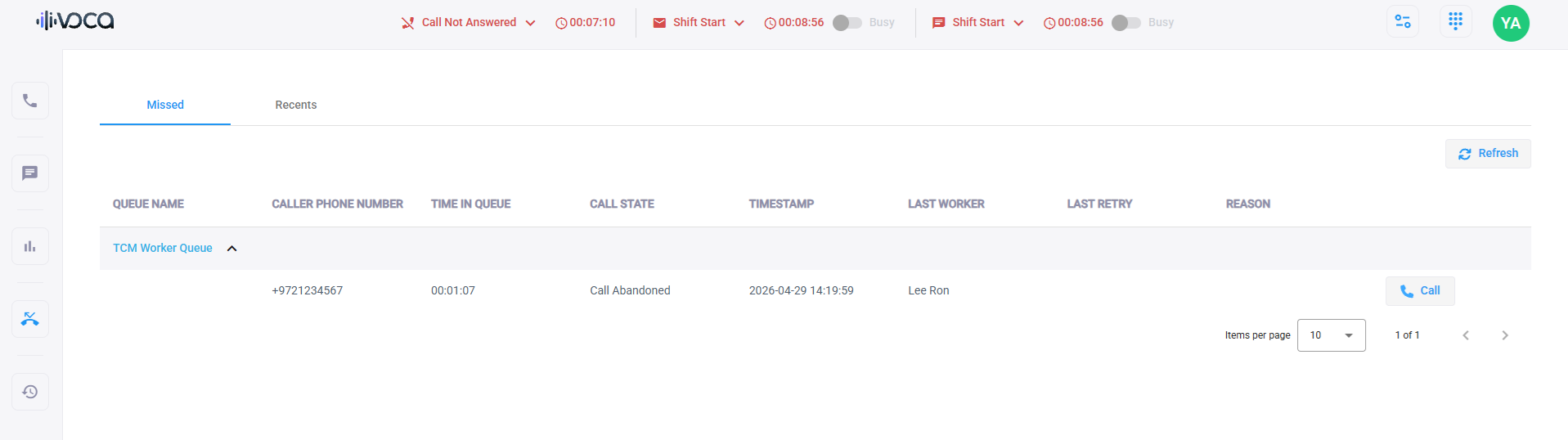
The fields of the ‘Queue Missed Calls History’ table are described in the following table:
|
Field |
Description |
|---|---|
|
'Queue Name' |
Defines the name of the queue. |
|
'Caller Phone Number' |
Defines the caller’s phone number. |
|
'Time in Queue' |
Displays how long the caller waited for a Worker in the queue. |
|
'Call State' |
Represents all the abandoned calls. |
|
‘Timestamp’ |
Displays the time when the call was missed. |
|
'Last Worker' |
Refers to the last Worker that called back to this caller. |
|
'Last Retry' |
Refers to the timestamp of the last call attempt by a Worker. |
|
'Reason' |
Displays the call attempt reason, for example, “Caller Busy” or “Caller Disconnect”. |
The page allows you to do the following:
| ■ | Call a Customer: You can call the customer, by clicking the Call  button. button. |
| ■ | Refresh Table: You can refresh the table, by clicking the Refresh  button. button. |
View recent calls
You can view all inbound and outbound calls that were recently made.
| ➢ | To view recent calls: |
| ■ | On the sidebar, click the Call History icon; the 'Recents' tab opens: |
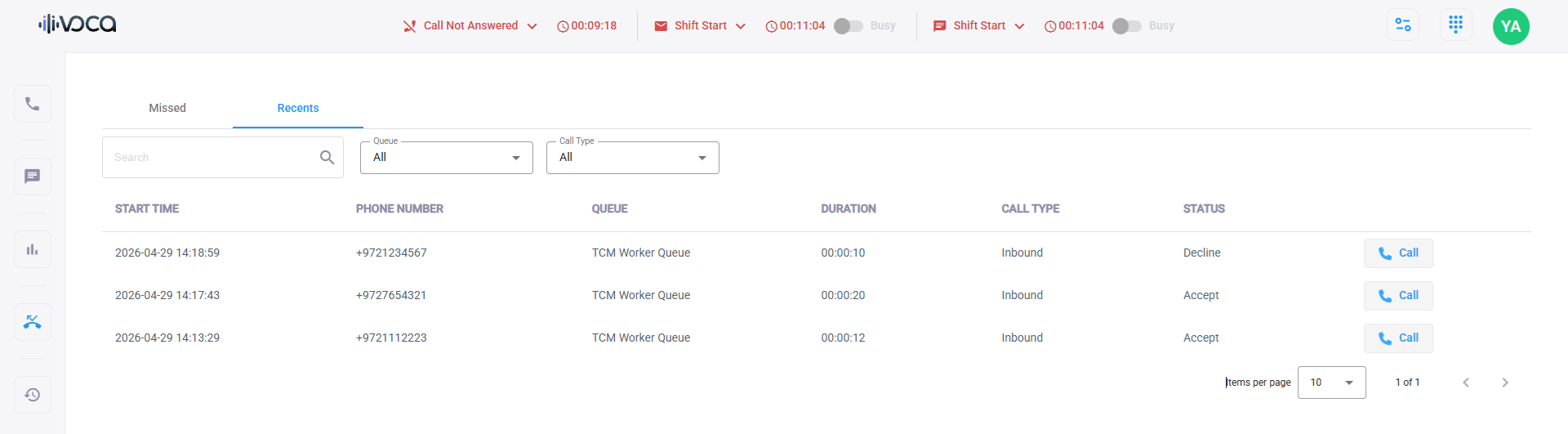
|
Field |
Description |
|---|---|
|
'Start Time ' |
Displays the time when the call was made. |
|
'Phone Number' |
Defines the caller’s phone number. |
|
'Queue' |
Defines the name of the queue. |
|
'Duration' |
Defines the call’s duration. |
|
'Call Type' |
Inbound or outbound |
|
'Status' |
Accepted or declined |